bicep heart trend
Turn a portrait photo into a 7-second bicep heart motion clip where the subject flexes an arm and forms a heart with their hands.
Upload a photo
or drag and drop your image here
Include as much of your upper body as possible and keep your face clearly visible. No special pose needed.
JPG, PNG, WebP · Max 5MB
Uses Seedance 2.0 Mini (ByteDance). Consumes 1 video credit. Choose 480p or 720p.
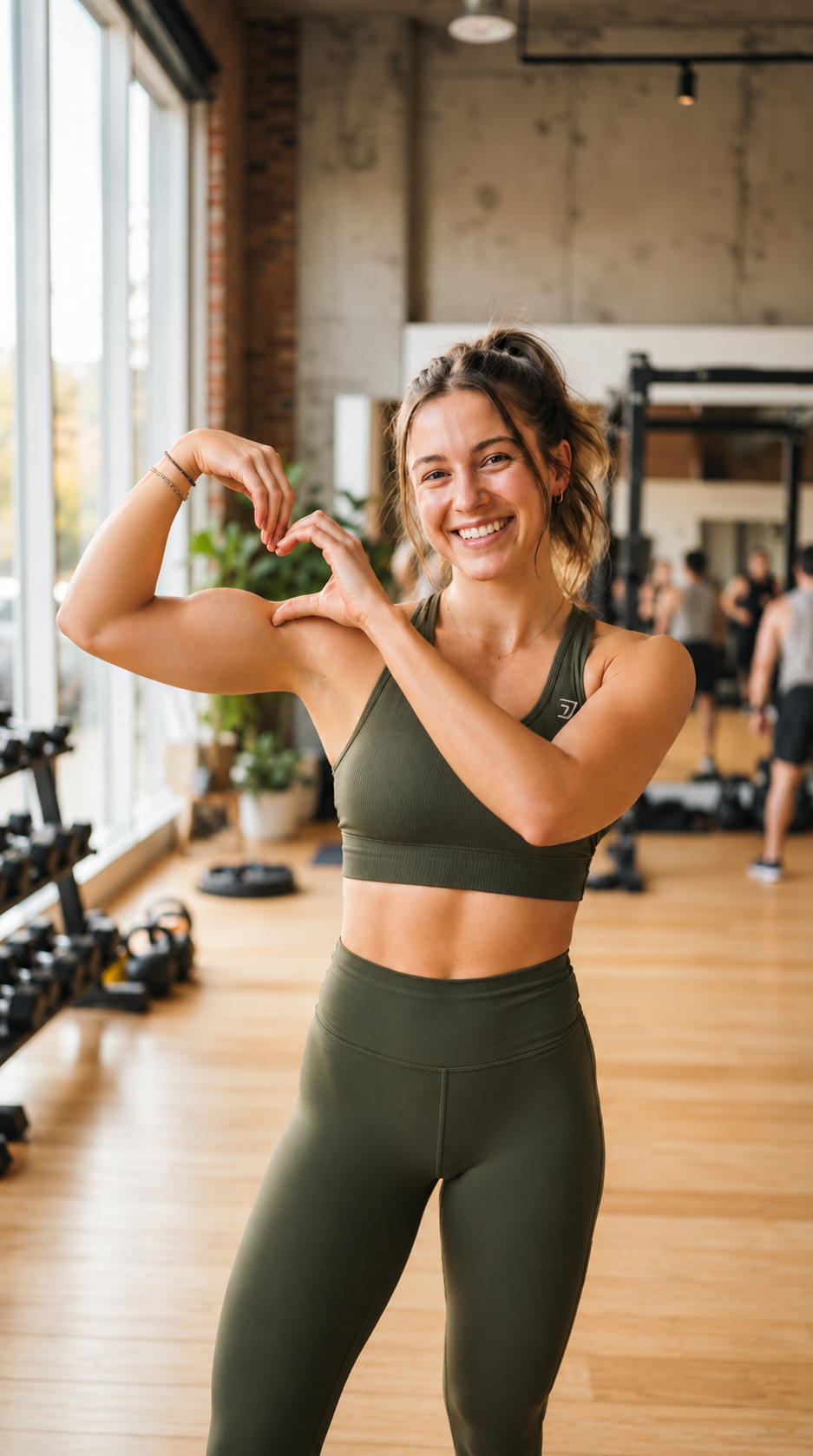
Upper body in frame, face clearly visible
Include as much of your upper body as possible. You don’t need to copy this pose.
What is the bicep heart trend?
The bicep heart trend is a short-form video style where a person or pet flexes one bicep while forming a heart shape with their hands next to the arm. In photo-to-video versions, the same pose is added to a still image. Rather than writing prompts or creating manual animations, you submit a single clear photo. The motion generator detects the subject and produces a looped video clip showing the bicep heart pose. The process attempts to preserve subject appearance and clothing, though minor visual artifacts may occur.
Photo Requirements
Recommended Photo Attributes
- Portrait orientation (9:16 recommended)
Use a vertical framing where the head, chest, and arms are comfortably within the frame.
- Face toward camera in balanced light
Face forward with even lighting so facial features remain clear during animation.
- Both arms visible (preferably short sleeves)
Ensure both arms and elbows are uncropped. Short or sleeveless shirts help render bicep flexion cleanly.
- Single-pet mode guidelines
For pet mode, use a clear photo of one dog or cat facing the camera with front paws and chest visible.
- JPG, PNG, or WebP up to 5MB
Supported image formats include JPG, PNG, and WebP, with file sizes of 5MB or smaller.
Issues to Avoid
- Sunglasses, masks, or photo filters
Avoid accessories obscuring the face, blur, or photo filters.
- Other people or pets in frame
Avoid photos with multiple individuals or crowded backgrounds.
How to Make Your Video
Upload photo & select options
Upload a JPG, PNG, or WebP image up to 5MB. Select Person or Pet mode, and choose 480p or 720p resolution.
Sign in & confirm generation
Sign in to access your account balance. Each video costs 1 credit from one-time packs ($4.99/1, $9.99/3, $19.99/7). A confirmation dialog appears before deduction.
Preview & download MP4
Track rendering status in My Videos. When ready, preview your 7-second 9:16 loop and download the MP4 file without watermarks.
Specifications & Pricing
7s
Seamless loop
9:16 MP4
Vertical orientation
480p / 720p
1 credit each
Silent · No Watermark
Clean export
7 seconds refers to the output video duration, not the processing time. Processing time varies depending on server queue; you can track status in My Videos.
Pick your video pack
Generated with Seedance 2.0 Mini (ByteDance). No recurring subscriptions. Video credits never expire.
Single Pack
- 1 video credit ($4.99/credit)
- Person and Pet modes included
- Both 480p and 720p supported
- 100% clean video export, zero watermarks
- Unused video credits never expire
- Failed generation automatically restores credit
Trio Pack
- 3 video credits ($3.33/credit)
- Person and Pet modes included
- Both 480p and 720p supported
- 100% clean video export, zero watermarks
- Unused video credits never expire
- Failed generation automatically restores credit
Creator Pack
- 7 video credits ($2.86/credit)
- Person and Pet modes included
- Both 480p and 720p supported
- 100% clean video export, zero watermarks
- Unused video credits never expire
- Failed generation automatically restores credit
Demonstration Examples
Dim indoor light
Man in gray shirt in dim indoor light
Daylight pet
Corgi in daylight
Purple indoor light
Man in gray shirt with purple lighting
Woman in natural light
Woman in yellow shirt in bright daylight
Frequently Asked Questions
What makes a photo unsuitable for the bicep heart trend?
Photos where arms or elbows are cropped, faces are obscured by sunglasses or masks, or multiple people appear frequently fail or produce distorted motion. Low-light and blurry images also reduce quality. If your photo does not meet these guidelines, replace or reframe it before submitting to avoid poor results or lost credits.
Can clothing or background change during generation?
No. There are no controls to modify clothing, hairstyle, or background scenery. The process attempts to animate the subject directly from your uploaded photo, but cannot guarantee perfect preservation or custom styling.
How long is the clip, and how long does generation take?
The output video is a 7-second vertical (9:16) MP4 loop. Processing time varies depending on server queue and load; it is not generated in 7 seconds. You can track task status live in the My Videos section.
Does the generated video include sound or music?
No. Generated videos are exported as silent MP4 files without audio. You can add music or voiceovers in your preferred video editor or directly within social apps.
Do I need to enter a text prompt to create the video?
No prompt is needed. The generation pipeline is pre-configured for the bicep heart motion. You only need to upload your photo, pick Person or Pet mode, and choose your resolution.
How does pricing work, and do video credits expire?
Both 480p and 720p resolutions cost 1 video credit per generation. Credits are purchased via one-time packs: $4.99 for 1 video, $9.99 for 3 videos, or $19.99 for 7 videos. There are no recurring subscriptions, credits do not expire, and failed generations are automatically refunded.